
You can share the receipt for any Snapiro transaction as an image or a PDF. Open the transaction from Activity, tap Share receipt and send it through WhatsApp, email or any app on your phone.
Steps
- Tap the Activity tab and find the transaction. Use the Naira, Crypto or Gift cards tabs at the top.
- Tap the transaction. The Receipt opens.
- Tap Share receipt.
- Choose Image (photo) or PDF document.
- Your phone’s share sheet opens. Pick the app or contact you want to send it to, or save it to your files.
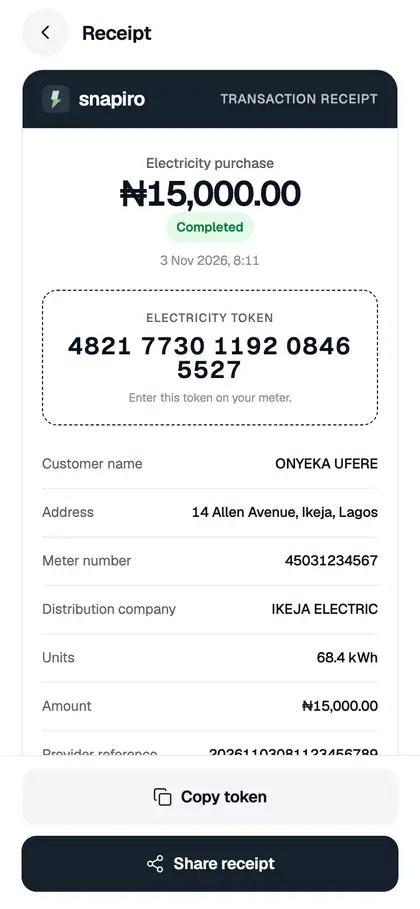
Just paid a bill? Tap View receipt on the “Payment successful” screen to go straight to it.
What the receipt shows
- the title, amount and status
- details for that type, such as the beneficiary, bank and fee for a withdrawal, the phone number, plan, smartcard or meter for a bill, the network and Blockchain hash for crypto, or the card, rate and photos for a gift card
- the Snapiro reference and date
- a note that the receipt was generated electronically by Snapiro and is valid without a signature
Bank account numbers are partly hidden on withdrawal receipts.
Electricity tokens
On an electricity receipt, tap Copy token to copy the token on its own. See how to buy electricity.
Sending a receipt to support
You can’t attach files to a support message, so type out the Snapiro reference instead (press and hold it to copy). See how to contact support and how to view your transaction history.
