
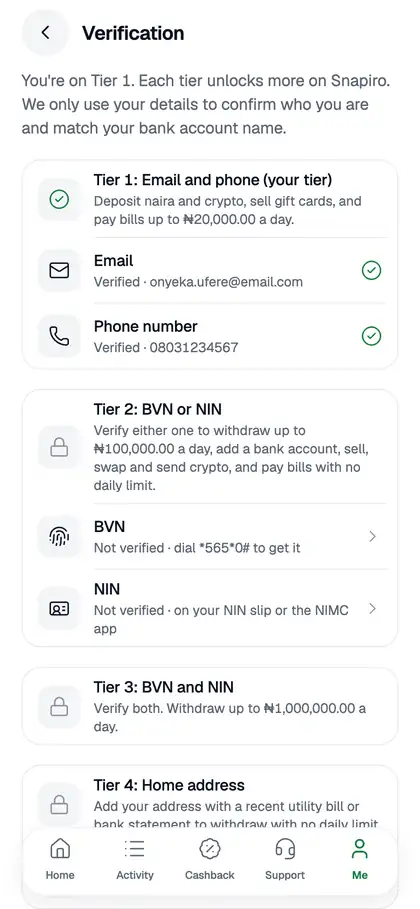
Snapiro uses verification tiers. You start on Tier 1 as soon as your email and phone are verified, and you move up by verifying your BVN and your NIN. Each tier unlocks more.
You’ll find your tier under Me › Verification. The row shows “Tier X of 3”.
What each tier unlocks
| Tier | What you verify | What you can do |
|---|---|---|
| Tier 1 | Email and phone (done when you sign up) | Deposit naira and crypto, sell gift cards, redeem vouchers and pay bills up to ₦20,000 a day |
| Tier 2 | BVN or NIN | Add a bank account, withdraw up to ₦100,000 a day, sell and send crypto, pay bills with no daily limit |
| Tier 3 | BVN and NIN | Withdraw with no daily limit |
The limits are set by Snapiro and the amounts above are the defaults. The app always shows the current figures on the Verification screen.
How the daily limits work
“A day” means the last 24 hours, not a calendar day. Pending, processing and completed payments all count. When you reach a limit the app tells you how much you have left, for example “At Tier 2 you can withdraw up to ₦100,000 in 24 hours (₦X left).” Wait for older payments to fall outside the 24 hours, or move up a tier.
How to move up a tier
- Tap the Me tab, then Verification.
- Tap BVN or NIN and enter the 11-digit number. Either one gets you to Tier 2.
- Verify the other one to reach Tier 3.
Step-by-step guides: verify your BVN and verify your NIN.
What the statuses mean
- Verified: done.
- Being reviewed: our team is checking it by hand. See my verification is being reviewed.
- Not verified: you haven’t done this step yet, or it didn’t go through. You can try again.
Before you verify
If you try to withdraw or add a bank account on Tier 1, a pop-up says “Verify your BVN or NIN to withdraw. It only takes a minute.” Tap Verify now to go straight to the right screen.
The name on your BVN and NIN must match. The first one you verify becomes your name on Snapiro, and any bank account you add must be in that name. If they don’t match, see my BVN and NIN names don’t match.
Why do we ask at all? Our KYC explainer covers it.
