
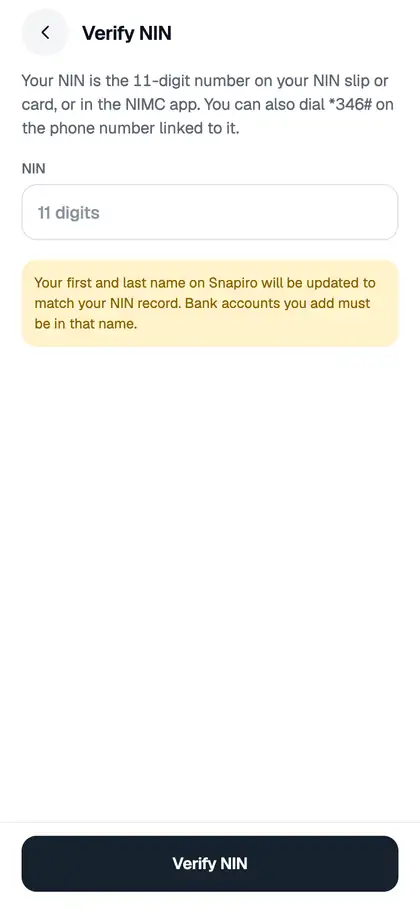
You verify your NIN with just the 11-digit number. No photos, passport or driver’s licence needed. NIN on its own gets you to Tier 2, and NIN plus BVN gets you to Tier 3. You can do either one first.
Where to find your NIN
- On your NIN slip or National ID card
- In the NIMC app
- By dialling *346# on the phone number linked to your NIN
Steps
- Tap the Me tab, then Verification.
- Tap NIN.
- Enter your 11-digit NIN.
- Tap Verify NIN.
You’ll usually see “NIN verified” and “Your name on Snapiro now matches your NIN.” If our team needs to check it by hand, you’ll see “NIN submitted”. See my verification is being reviewed.
Messages you might see
- “Your NIN has 11 digits.”: check the number.
- “We couldn’t verify that NIN. Check the number and try again.”: it may be mistyped.
- “This NIN is already linked to another Snapiro account. Contact support if that’s not you.”: message us through the Support tab if it isn’t your account.
- “The name on this NIN doesn’t match the name on your BVN.”: see my BVN and NIN names don’t match.
- “Your BVN is still being reviewed. You can add your NIN once it’s done.”: wait for the BVN decision.
- “You’ve tried verification several times today. Try again tomorrow or contact support.”: there’s a daily limit on attempts.
Verified an ID before?
If you verified a passport, driver’s licence or voter’s card on the old app, it still counts as your second ID and shows under its own name on the Verification screen.
See verification tiers and limits for what each tier unlocks.
