
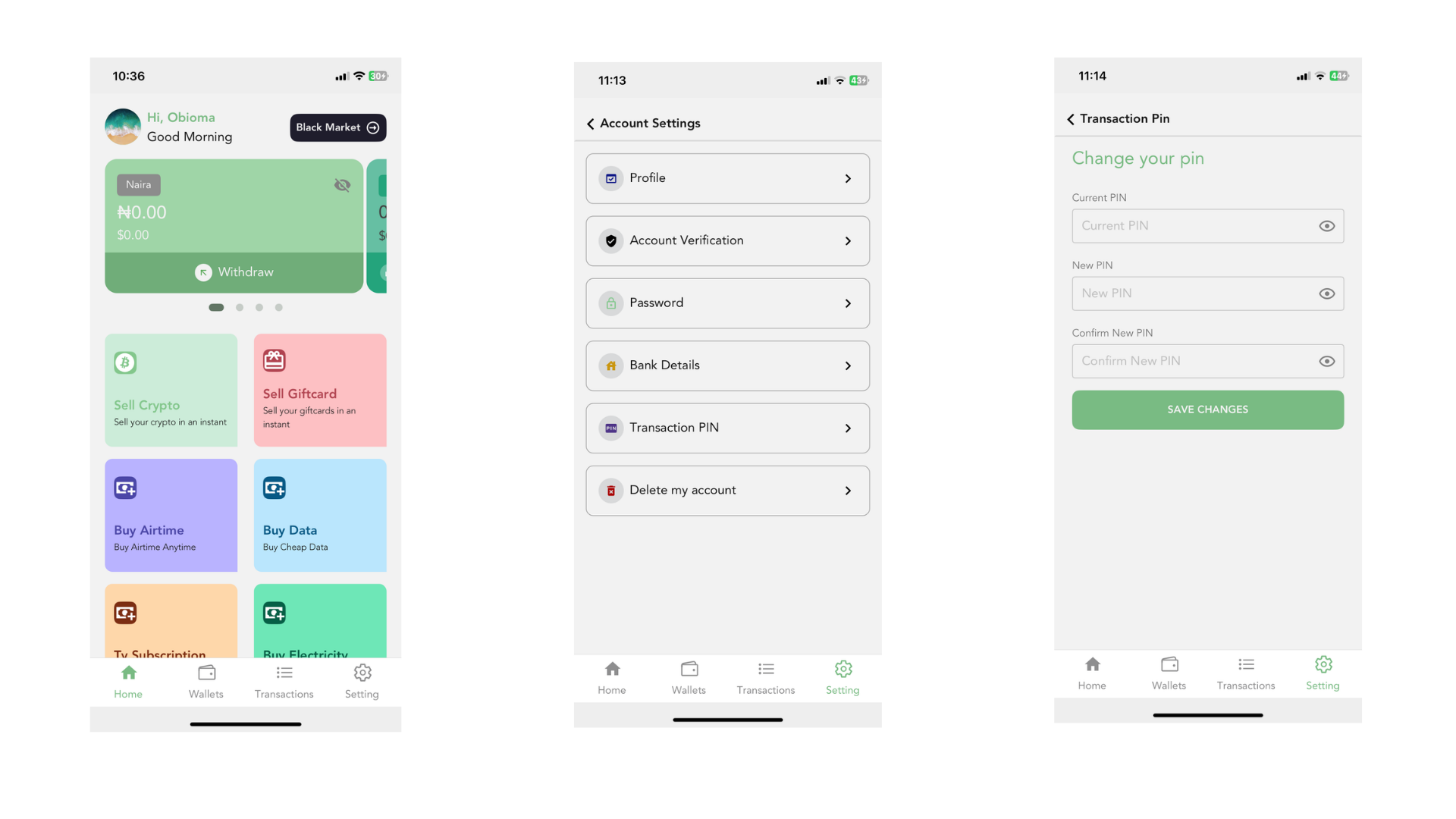
If you know your current transaction PIN, you can change it in a few taps. You will need the current PIN to do it.
Steps
- Tap Settings at the bottom right of the app.
- Tap View Profile, then Transaction PIN.
- Enter your Current PIN.
- Enter your new 4-digit PIN in New PIN, then type it again in Confirm New PIN.
- Tap Save Changes. You will see “Transaction Pin changed successfully”.
Your new PIN works straight away for selling crypto, withdrawals, bill payments and cashback transfers.
If it does not work
- Incorrect Pin: the current PIN is wrong. Try again carefully.
- Old and new pin are the same: choose a different new PIN.
- New and Confirm Pin should be the same: retype the new PIN in both boxes.
Forgot your current PIN?
The app cannot reset a PIN you have forgotten. Read I forgot my transaction PIN to get help from our support team.
