
 Login and Account
 2FA & Security
 KYC
KYC Trade
Trade Transaction
 Wallet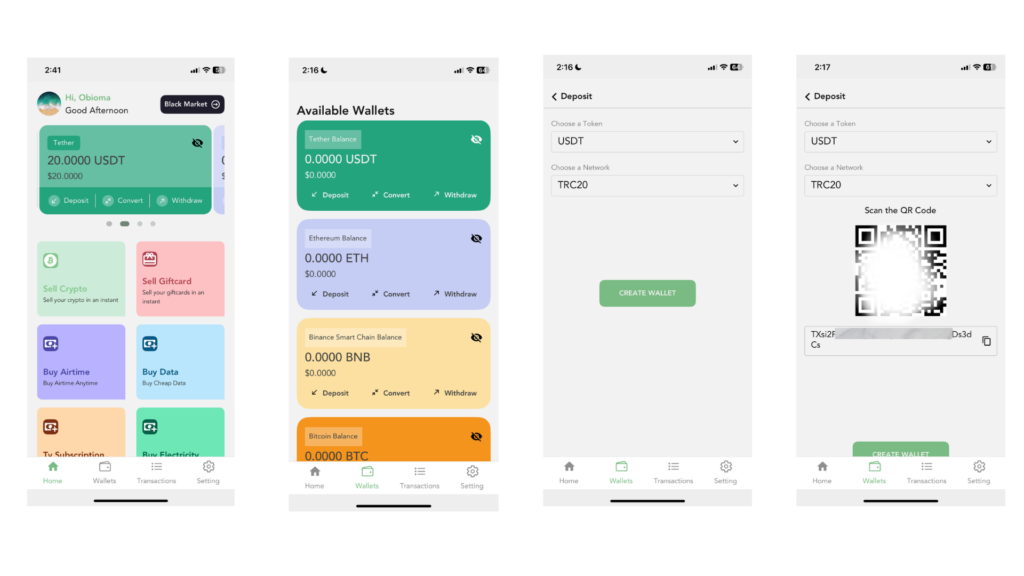
1. Log in to Your Snapiro Mobile App
Open the Snapiro app on your device and log in to your account. Once you are logged in, look at the bottom of your screen and tap the “Wallet” button. This section shows all the cryptocurrencies available for deposit on your Snapiro account.
2. Select the Cryptocurrency You Want to Deposit
You will see a list of different crypto assets. For this guide, we will use USDT. Locate USDT on the list and tap the “Deposit” button attached to it.
3. Choose the Right Token and Network
After tapping “Deposit,” you will be taken to a new page. Make sure that USDT is still selected under the “Choose Token” section.
Next, tap the “Select Network” bar. A list of networks will appear. Select the network that best suits your needs.
For this example, we will choose TRC20, as it is fast and has low fees.
4. Create Your Wallet Address (First-Time Users Only)
If this is your first time depositing USDT using the selected network, you will see a button that says “Create Wallet.”
Tap on it to generate your wallet address. This is a one-time process and usually takes only a few seconds.
5. Copy Your Wallet Address
After your wallet is created, the deposit address will appear on your screen.
Simply tap the copy icon to copy the wallet address. This is the address you will paste into the sending platform or exchange.
If you do not see the wallet address immediately:
- Go back to the previous page
- Tap on “Deposit” again
- Select the same token and the same network
The wallet address will show up instantly.
Once copied, you can now send your USDT from any external wallet or exchange using this address.

