
 Login and Account
 2FA & Security
 KYC
KYC Trade
Trade Transaction
 Wallet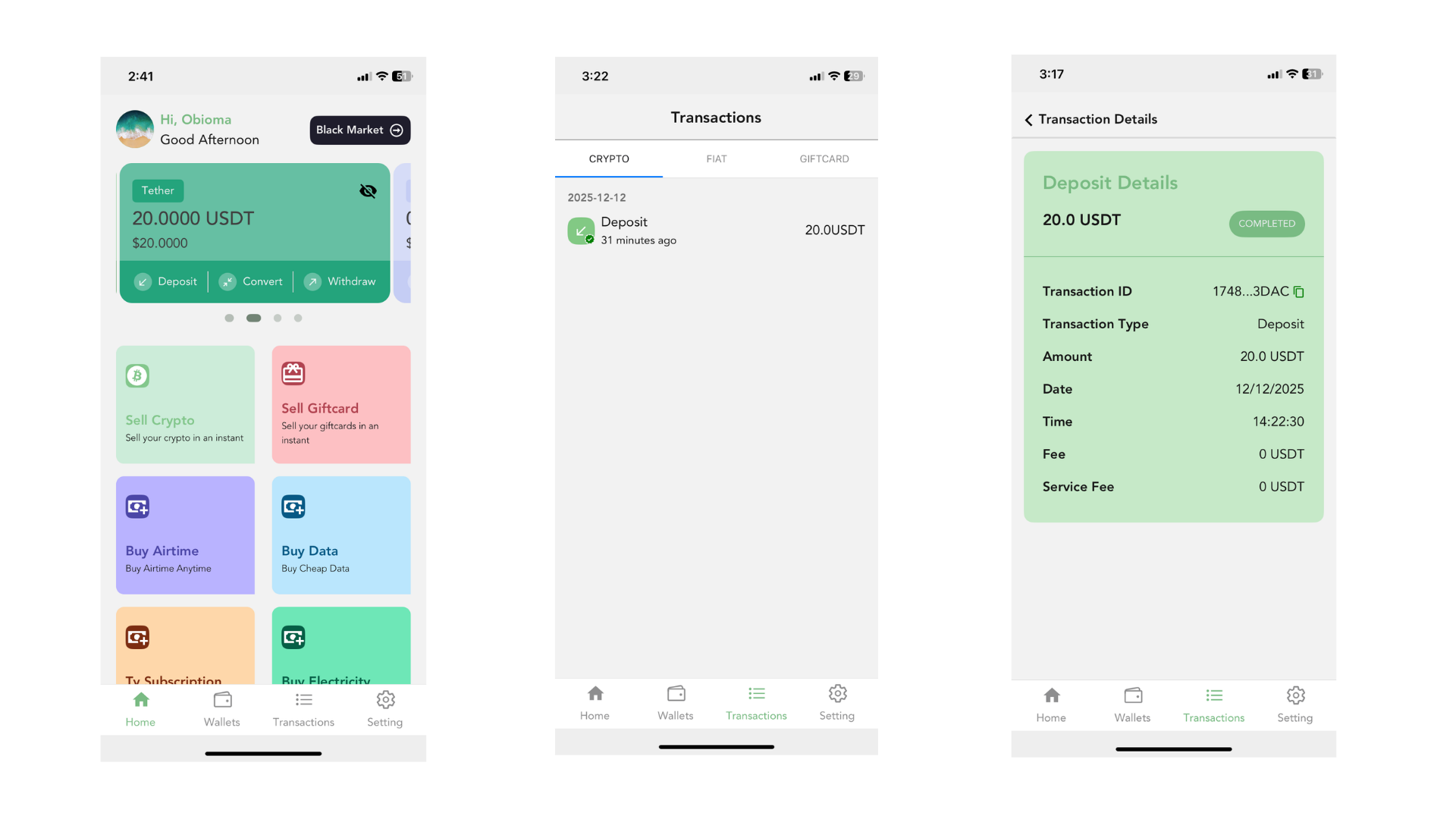
A Transaction ID (TxID) is like a special receipt for every crypto transaction you make. Whenever you send or receive crypto, the blockchain creates a unique code made up of letters and numbers. This code belongs only to that one transaction.
You can think of a TxID as a tracking number, similar to what you get when you send a package. With it, you can check the status of your deposit or withdrawal, see if it has been confirmed, and follow its movement on the blockchain.
In simple terms:
A TxID helps you find, verify, and track any crypto transaction you have made.
Now, let us Show you how you can copy your Transaction ID on the Snapiro Mobile App
On the Snapiro Mobile App, start by tapping the “Transactions” icon at the bottom of your screen. This will open a full list of all your crypto transactions, including deposits and withdrawals.
Scroll through the list and select any transaction you want to review. Once you tap on it, a new page will open showing detailed information about that specific transaction.
Among the details provided, you will find your Transaction ID (TxID). It will appear on the screen with a copy button beside it. Simply tap the copy button to copy your Transaction ID to your device.
This TxID can then be used to track your transaction on the blockchain or to share it with customer support when needed.

