
 Login and Account
 2FA & Security
 KYC
KYC Trade
Trade Transaction
 Wallet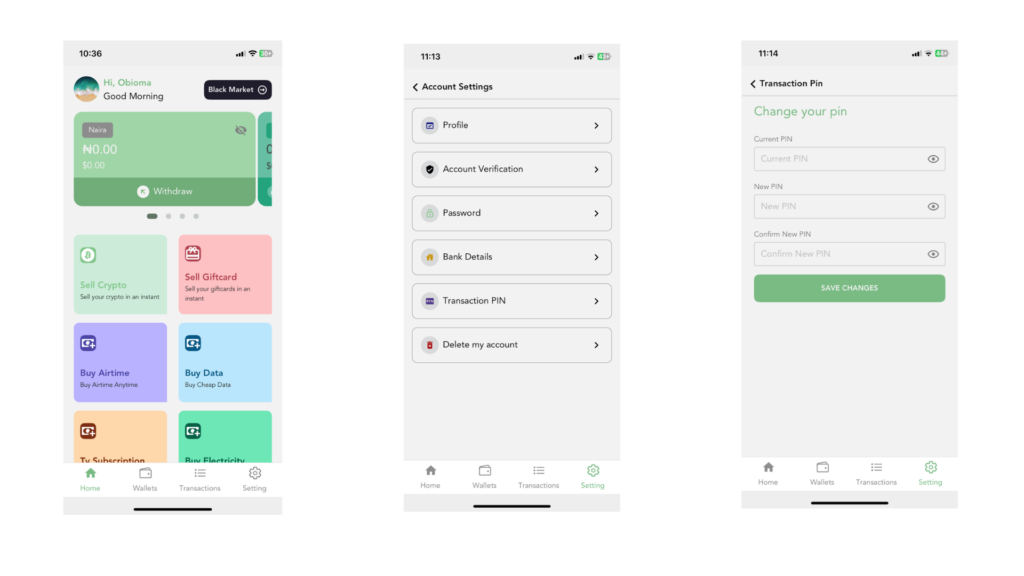
Here’s How to Reset Your PIN on Snapiro Mobile App;
To change your transaction PIN, begin by opening the Snapiro mobile app on your device. Once the app loads, look toward the bottom right corner of your screen and tap the “Settings” icon. This will take you to the section where you can manage and personalize your account.
Inside the Settings menu, find and select “Account Settings.” This page contains all the tools you need to update your personal information and security details. From there, look for the option labeled “Transaction PIN.” Tap on it to begin the process.
You will first be asked to enter your current PIN. This step confirms that you are the rightful owner of the account and ensures your security is not compromised.
After that, you can type in your new preferred PIN. Choose something easy for you to remember but difficult for others to guess. When you finish typing it in, you will be asked to confirm it by entering the same new PIN again. This helps prevent mistakes and ensures accuracy.
Finally, scroll down and tap the “Save Changes” button. Once you do this, your new PIN will be activated, and you can use it for all future transactions.
With just a few simple steps, you successfully update your security details and keep your Snapiro account safe.

